MLB.TV Blackout Workaround: How to Watch Every MLB Game in 2026 (VPN Method That Actually Works)
Want to watch your favorite MLB teams but keep running into MLB.TV blackout restrictions? A VPN (Virtual Private Network) is still the most reliable way to bypass MLB blackouts in 2026 — and I’ve been using this exact method to watch my Padres from Asia for years. It works. Here’s the proof and the full guide.
Tip: Best way and cheapest way to get every MLB game is by getting this Android TV Box. Our choice for best VPN is ExpressVPN. We have verified MLB TV works with ExpressVPN, just be sure to use Host name “Los Angeles 1”. Get 35% off ExpressVPN here.
Our VPN method 100% works in 2026. Check out the screenshot of me watching my favorite team, the Padres, as I’m typing this:
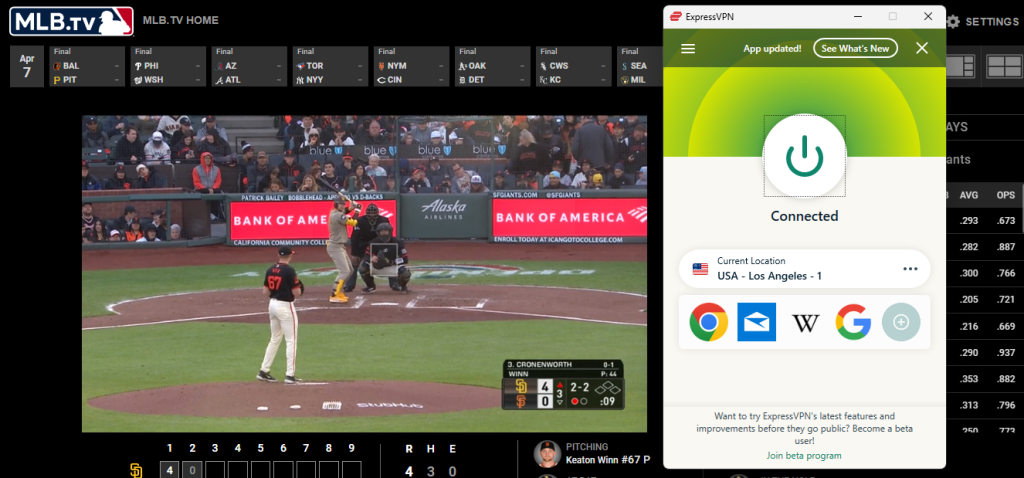
And guess what — I am currently located in Asia. Definitely an MLB blackout restriction area. But with a little VPN help, I can change my IP address to a server location within the USA and access MLB TV without any issues.
This workaround currently works for me whether I’m accessing MLB.tv directly or watching local channels through YouTube TV.
MLB Blackouts in 2026: What Changed and What Didn’t
The MLB broadcast landscape has changed dramatically. After the collapse of Diamond Sports Group (Bally Sports) and Main Street Sports, MLB took over local broadcast production for 15 of its 30 teams. As of 2026, 21 teams now offer some form of in-market streaming through the MLB App — meaning blackouts have been reduced for many fans.
Teams like the Padres, Guardians, Diamondbacks, Twins, Royals, and Brewers now have their own streaming options (Padres.TV, Guardians on MLB Local Media, Brewers.TV, etc.) that are blackout-free within their local markets.
But here’s the thing — blackouts are NOT gone. They still affect you if:
- You’re outside the US entirely — MLB.TV still does not allow streaming from outside the United States by default. If you’re an expat, traveling, or living abroad, you’re blacked out from everything.
- National broadcast games — Games on FOX, ESPN, NBC, Apple TV+, and Netflix are blacked out on MLB.TV regardless of your location. In 2026, national games are now split across six different platforms.
- You’re in an overlapping blackout zone — States like Iowa are still blacked out from six different teams. If you live in one of these overlap areas and don’t have the right RSN or local streaming service, you’re stuck.
- Teams still on traditional RSNs — The Yankees (YES Network / Gotham Sports App), Dodgers (SportsNet LA), Mets (SNY), Red Sox (NESN), and others still operate through regional sports networks with in-market blackout rules on MLB.TV.
So if you’re an expat, a cord-cutter in a blackout zone, or someone who just wants to watch every game without juggling six different subscriptions — a VPN is still the answer.
VPN Comparison: Best VPNs for MLB.TV in 2026
| Feature | ExpressVPN (Our Pick) | Unlocator | NordVPN |
|---|---|---|---|
| Type | Full VPN | Smart DNS + VPN | Full VPN |
| US Servers | 18 US cities | Routes MLB traffic through UK | 16 US locations (~2,000 servers) |
| Works on Desktop | ✅ Verified | ✅ Verified | ✅ Verified |
| Works on Mobile App | ✅ (browser method) | ✅ Smart DNS works on all devices | ✅ (browser method) |
| Works on Smart TV / Roku / Apple TV | ✅ via MediaStreamer or router | ✅ Smart DNS native support | ✅ via SmartPlay |
| Streaming Speed | Excellent (Lightway protocol) | Excellent (no encryption overhead) | Excellent (NordLynx protocol) |
| Money-Back Guarantee | 30 days | 30 days | 30 days |
| Free Trial | No (but 30-day refund) | 7-day free trial, no credit card | 3-day trial (Android) |
| Also Unblocks YouTube TV, Netflix | ✅ Yes | ✅ Yes | ✅ Yes |
| Best For | Expats & power users who want full VPN protection | Streaming devices (Apple TV, Roku, Smart TV) | Budget-conscious fans who want lots of server options |
How to Access MLB Streaming Using ExpressVPN
By routing your traffic through a VPN, you can access MLB.TV with complete freedom. No more blackout screens. Here’s exactly how I do it:
Step 1: Sign up for ExpressVPN. They offer a 30-day money-back guarantee, so if it doesn’t work for your situation, you get a full refund.
Step 2: Download and install the ExpressVPN app on your device (Windows, Mac, iPhone, Android — they have apps for everything).
Step 3: Open ExpressVPN and connect to a US server. I personally use the “Los Angeles 1” server, and it works great for MLB.TV, YouTube TV, and Netflix.
Step 4: Open your web browser (Chrome or Firefox recommended) and go to MLB.TV. Log in and start watching.
That’s it. The entire process takes about 2 minutes.
Important: Not every server in ExpressVPN will get you access to MLB TV games. If “Los Angeles 1” doesn’t work for you, contact their customer service via live chat — they’re responsive and friendly, and they’ll find a server location that works for your specific situation.
For me, the “Los Angeles 1” server also gets me access to YouTube TV and Netflix, so I have zero restrictions watching all the programming I want while living abroad.
Unblock MLB Blackout Restriction Via YouTube TV
This is a bonus that a lot of people don’t realize. If you have a YouTube TV subscription, you can use the same VPN to access all your YouTube TV channels from abroad — including ESPN, TBS, FOX, and NBC, which carry national MLB games.
Here’s me watching an MLB game on ESPN through YouTube TV, also using ExpressVPN:
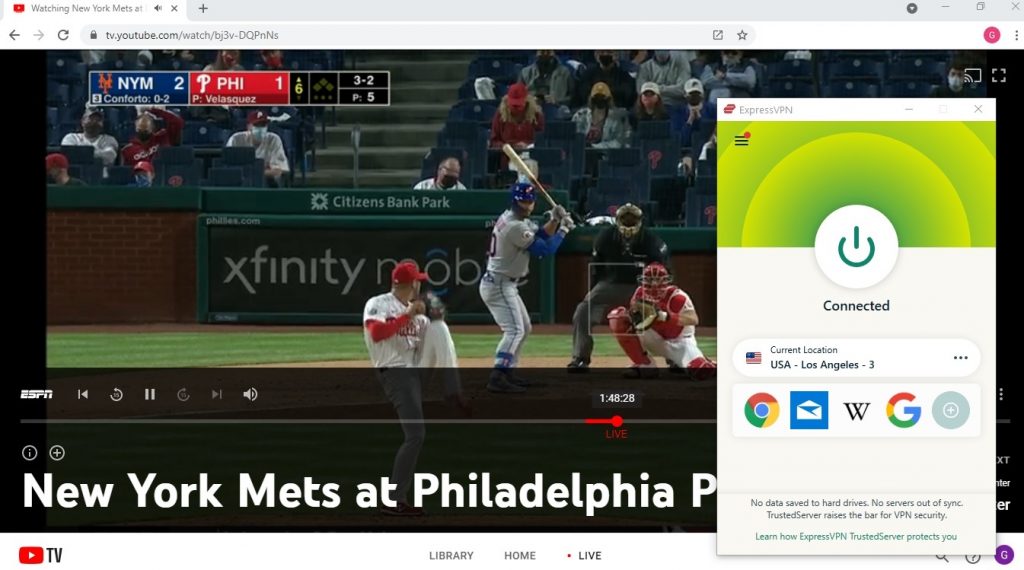
This is huge because in 2026, national MLB games are now spread across six different platforms (NBC, FOX, ESPN, Apple TV+, Netflix, and Peacock). If you have YouTube TV + ExpressVPN, you can catch the games on FOX, ESPN, NBC, and TBS without needing separate subscriptions for each one.
Watch MLB Outside the US From Abroad
For you expats, I get it — it’s hard to follow your team while living overseas. I’ve been living in Asia for years now, and I have not had any issue following my Padres. All you need is a VPN to get through the blackout problem.
ExpressVPN is the service I personally use, and it solves both of the most common issues for fans abroad:
- Watching MLB.TV from outside the US: MLB.TV does not allow streaming from outside the United States by default. With a VPN, you connect to a US server, and MLB.TV thinks you’re in the States. Problem solved.
- Watching local blackout games: Even if you have a US-based VPN connection, you might still hit local blackouts depending on which server you connect to. The fix is simple — just pick a server in a city that isn’t in your team’s blackout zone. For example, if your team is blacked out in New York, connect to a server in Los Angeles or Chicago.
Yes, you can even watch MLB games on the MLB app on your iPhone with this VPN — just use the browser method (more on that below).
Device-by-Device Guide: Where VPNs Work Best for MLB
This is important because the VPN workaround works differently depending on what device you’re using:
Desktop / Laptop (Easiest — Recommended)
This is the easiest and most reliable method. When you watch MLB.TV in a web browser like Chrome or Firefox, MLB only checks your IP address to determine your location. A VPN changes your IP address, so you’re good to go. No extra steps needed.
- Connect to ExpressVPN (I use “Los Angeles 1”)
- Open Chrome or Firefox
- Go to MLB.TV, log in, and watch
This is my primary method and it has worked flawlessly for years.
iPhone / Android (Use the Browser, Not the App)
Here’s what a lot of people don’t know: the MLB app on your phone uses GPS location in addition to your IP address. A VPN only changes your IP — it does NOT change your GPS location. As of 2026, MLB has gotten much better at detecting mock GPS locations on mobile devices.
The workaround: Don’t use the MLB app. Instead, open Safari (iPhone) or Chrome (Android), go to MLB.TV in the browser, and watch from there. The browser only checks your IP address, same as desktop.
Smart TV / Roku / Apple TV / Fire Stick
These devices don’t support VPN apps directly, so you have two options:
- Option 1: Install ExpressVPN on your router. This routes all traffic from every device on your network through the VPN. ExpressVPN has a dedicated router app that makes this relatively painless. You can also buy a pre-configured router from them.
- Option 2: Use Unlocator Smart DNS. This is actually where Unlocator shines — their Smart DNS works natively on Apple TV, Roku, Smart TVs, and Fire Sticks without needing to install anything on your router. You just change the DNS settings on your device.
- Option 3: Use your laptop as a virtual router. Connect your laptop to ExpressVPN, then share the VPN connection via a Wi-Fi hotspot. Connect your Roku or Apple TV to that hotspot.
Android TV Box (SuperBox)
If you have an Android TV Box like SuperBox, you can install the ExpressVPN app directly on it since it runs Android. This is actually the simplest streaming device setup because the VPN app installs just like it would on an Android phone.
ExpressVPN — Our #1 Pick for MLB.TV

ExpressVPN
ExpressVPN is my primary option for accessing MLB from outside the US and for avoiding blackouts. They have servers in 18 US cities and 105 countries total, giving you tons of options for location masking and the freedom to access any MLB content, including live TV.
Their Lightway protocol is built for streaming — fast connections, low latency, and stable enough to watch an entire 9-inning game without a single buffer. I’ve been streaming from Asia on the “Los Angeles 1” server for years, and the picture quality is consistently excellent.
You also get 256-bit AES encryption, DNS and IPv6 leak protection, and a kill switch that protects your real IP if the connection drops mid-game. But honestly, for MLB purposes, what matters most is that it just works — reliably, every time.
Pro tips from my personal experience:
- Best server for West Coast teams: “Los Angeles 1” — this is my go-to for the Padres and it also unlocks YouTube TV and Netflix.
- If a server stops working: Contact their live chat support. They’ll find you a working server in minutes. Their support team is fast and actually helpful.
- Money-back guarantee: If you can’t get it working for your specific setup, you get a full refund within 30 days. No questions asked.
Get our discount for ExpressVPN here
Unlocator — Best for Streaming Devices

Unlocator
Unlocator is not a traditional VPN — it’s a Smart DNS service, which makes it a great option specifically for streaming devices that don’t support VPN apps (Apple TV, Roku, Smart TVs, gaming consoles).
The advantage of Smart DNS over a VPN is that there’s no encryption overhead, so your streaming speeds are essentially the same as your normal internet speed. The downside is that it doesn’t encrypt your traffic or provide the same privacy protection as a full VPN.
What makes Unlocator particularly great for MLB is their hybrid mode — when you connect through their VPN, they route all MLB traffic through the UK, which means MLB’s blackout detection is never triggered regardless of which server you’re on.
The best part: they offer a 7-day free trial with no credit card required. So you can test it on your Apple TV or Roku before you pay a dime.
NordVPN — Best Budget Option With the Most Servers
NordVPN
NordVPN is a solid alternative if ExpressVPN doesn’t work for your situation or you want a cheaper option. They have around 2,000 servers in the US alone across 16 locations, which gives you a lot of options for getting around blackout zones.
Their NordLynx protocol (based on WireGuard) delivers fast streaming speeds, and their SmartPlay feature is a hybrid VPN + Smart DNS that works particularly well with streaming services. NordVPN also offers obfuscated servers that can bypass VPN detection — useful if MLB.TV ever starts blocking standard VPN connections.
NordVPN is generally a few dollars cheaper per month than ExpressVPN on longer plans, and they occasionally offer a 3-day free trial on Android.
What About the MLB App Detecting VPNs?
This is the #1 question I get. Here’s the honest answer as of 2026:
On desktop browsers: MLB.TV only checks your IP address. A VPN changes your IP, so you’re in the clear. This method has worked for me for years without a single issue.
On mobile apps (iPhone/Android): The MLB app now checks your device’s GPS location in addition to your IP address, and it can detect mock/fake GPS apps. This means running a VPN on your phone and opening the MLB app will likely NOT work. The solution: Use the mobile browser (Safari on iPhone, Chrome on Android) instead of the app. The browser only checks your IP, just like on desktop.
On streaming devices (Roku, Apple TV, Fire Stick): These devices don’t expose GPS data to apps, so the IP-based method works. Use either a VPN on your router or a Smart DNS service like Unlocator.
Will MLB ban my account? I’ve been using a VPN to watch MLB.TV for years and have never had my account suspended or terminated. Using a VPN is technically against MLB.TV’s terms of service, but there are no known reports of accounts being banned for it.
Which MLB Teams Are Still Blacked Out in 2026?
With all the changes to MLB broadcasting, here’s a quick breakdown of the current situation:
Teams with blackout-free local streaming (through MLB App or team-specific streaming): Padres, Guardians, Diamondbacks, Twins, Royals, Brewers, Reds, Rockies, Mariners, Rangers, Rays, Marlins, Athletics, and several others — 21 teams total now offer some form of in-market streaming.
Teams still on traditional RSNs (blackouts still apply on MLB.TV): Yankees (YES/Gotham Sports App), Dodgers (SportsNet LA), Mets (SNY), Red Sox (NESN), Cubs (Marquee Sports Network), Phillies (NBC Sports Philadelphia), Braves (TBS regional), Astros (Space City Home Network), and the White Sox (Chicago Sports Network).
National broadcast blackouts (affect everyone): Games on FOX, ESPN, NBC, Apple TV+, Netflix, and Peacock are blacked out on MLB.TV regardless of your location.
The bottom line: even though blackouts are shrinking, a VPN is still essential if you’re outside the US, in an overlap blackout zone, or want access to nationally broadcast games through YouTube TV or similar services.
FAQ
Is it legal to use a VPN to watch MLB.TV?
Using a VPN is legal in the United States and most countries. However, bypassing MLB.TV’s blackout restrictions does violate their terms of service. That said, there are no known cases of MLB banning or suspending accounts for VPN use. The worst that typically happens is you’ll see a blackout error message, which usually means you need to switch to a different VPN server.
Does MLB.TV detect VPNs?
MLB.TV does attempt to detect and block known VPN IP addresses. This is why you want a premium VPN like ExpressVPN or NordVPN that regularly rotates their server IPs. If you get blocked, simply disconnect, reconnect to a different server, and try again. In my experience with ExpressVPN, this rarely happens.
Can I watch MLB.TV on my phone with a VPN?
Yes, but use your phone’s web browser (Safari or Chrome) instead of the MLB app. The app uses GPS location which is much harder to spoof. The browser only checks your IP address, which the VPN handles.
What’s the cheapest way to watch every MLB game in 2026?
An MLB.TV subscription ($149.99/year or $24.99/month) plus a VPN like ExpressVPN gives you access to every out-of-market game. Combine that with YouTube TV and the same VPN, and you’ll also get national broadcast games on FOX, ESPN, NBC, and TBS. Or, the absolute cheapest option is an Android TV Box that gives you access to every game without any additional subscriptions.
Which VPN server should I use for MLB.TV?
I use ExpressVPN’s “Los Angeles 1” server and it works consistently for MLB.TV, YouTube TV, and Netflix. If you’re trying to bypass a local blackout for a specific team, pick a server in a city that’s outside that team’s blackout territory. For example, if you’re blacked out from the Yankees in New York, connect to a server in Los Angeles or Chicago.
Do I need a VPN if my team has blackout-free streaming now?
If you’re watching from within the US in your team’s local market, and your team is one of the 21 that now offers in-market streaming, you might not need a VPN for local games. But you’ll still need one if you’re outside the US, in an overlapping blackout zone, or want to watch national broadcast games that are blacked out on MLB.TV.
Verdict
So which VPN should you use for accessing MLB without blackouts? I recommend ExpressVPN — it’s the only VPN I personally use to watch my Padres every season, and it has never let me down. The “Los Angeles 1” server works like a charm for MLB.TV, YouTube TV, and Netflix, even from Asia.
If you’re primarily watching on a streaming device like Apple TV or Roku, give Unlocator a try — their Smart DNS is built for exactly that use case, and you can test it free for 7 days.
And if you want the most server options at a lower price point, NordVPN is a solid choice with around 2,000 US servers and the NordLynx protocol for fast streaming.
All three services offer money-back guarantees, so you can try them risk-free during the season.
Tip: Best way and cheapest way to get every MLB game is by getting this Android TV Box. Our choice for best VPN is ExpressVPN. We have verified MLB TV works with ExpressVPN, just be sure to use Host name “Los Angeles 1”. Get 35% off ExpressVPN here.